01
Start with your eyes.
Take a photo with your eyes open and another gently closed. Your own canvas, from both points of view.
Your personal eye-makeup studio
Find a look you love. See it on your own eyes. Then learn to make it yours, one easy step at a time.
A little preview. App coming soon.
 A little possibility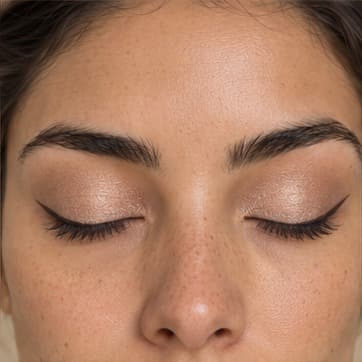
Soft kitten flick
Espresso liner · champagne shimmer
AI-created sample model. A little inspiration, not a personal result.
Your eyes, your starting point
From inspiration to application
No account needed
Meet your new getting-ready ritual
From “could I pull that off?” to “I made this my own.”
Take a photo with your eyes open and another gently closed. Your own canvas, from both points of view.
Find your mood. Adjust the wing, the color, the shimmer. Create an AI preview before reaching for your liner.
Follow a guide for your chosen look, practice at your own pace, and save the ones you want to come back to.
A look for every version of you
Soft and subtle. A little drama. Something bold. There’s no wrong place to start.
 Curated sample
The everyday favorite
A little flick. A lovely difference.
A soft espresso wing with a wash of champagne shimmer. Small, subtle, and just enough.
Explore AI-created sample looks here. In the app, create and customize previews with your own photos.
Your little practice
Soft kitten flick
A little progress, one step at a time.
Sample lookStep 2 of 5
Lay down the champagne
Sweep a sheer wash of champagne shimmer across your lid. Soften the edge with a clean brush.
Note to self
A shorter wing is so me.
An illustration of the in-app experience.
Inspiration is only the beginning
Choose colors, finishes, and tools you already have. Find inspiration that fits your mood and your morning.
Practice with a guide for your exact recipe, optional spoken instructions, and helpful tips when you need them.
Save looks, make variations, and add your own notes. Your collection stays on your device, ready for next time.
Your eyes. Your photos. Your choice.
No account needed. Photos are sent for AI previews only with your permission. Saved looks and practice notes stay on your device.
A few little details
A little more about your new studio, before you make yourself at home.
eyestudio is your personal eye-makeup studio. Explore liner and shadow looks, customize a recipe, see an AI preview on your own photos, and follow a step-by-step application guide. The app is coming soon; you can explore curated samples on this website today.
You can start right where you are. Looks range from beginner-friendly tightlines and kitten flicks to more expressive graphic shapes. Choose your experience level and available time in the app to find a helpful starting point, then practice at your own pace.
Yes. Tell the app about the liner colors, shadows, finishes, and tools in your makeup bag. Your preferences help shape your recipe and the looks suggested to you.
The website shows curated, AI-created sample models. In the app, you can use your own open-eye and closed-eye photos to create personal AI makeup previews. Generated results are inspiration and may vary in detail; review both views before applying your look.
The app asks for permission before each AI upload or retry. Our preview server keeps temporary photos and results in memory for up to 15 minutes; you can clear them sooner. OpenAI processes AI previews under its own retention policy, explained in the app before uploading. Saved looks, practice photos, and notes stay on your device. You can delete your saved data in the app.
We’re getting eyestudio ready for iOS and Android. There isn’t a public download link or confirmed release date yet. For now, explore the six sample looks above and find a little inspiration for your next getting-ready ritual.
Your next favorite look is waiting
We’re putting the finishing touches on eyestudio. Until then, meet the looks that could be your next everyday favorite.
Explore the looksApp coming soon for iOS and Android